It was 3 AM at the end of an AI Vibe Coder hackathon I was running.
We needed a scoring board for the special prizes. It had to run on a TV, read the scores from the database, and let the judges enter their scores.
Nothing technically difficult.
I was exhausted, so I did what seemed obvious. I put everything into one big prompt and hit go.
Error after error.
The AI took one feature in the wrong direction, and that affected everything that came after it. Things stopped fitting together. I spent hours trying to fix it, got nowhere, and went to bed with nothing working.
The next morning, after three hours of sleep, I started again.
This time I broke the work down. One thing at a time. Each request had a clear scope and a clear outcome.
Thirty minutes later, it was running on the TV.
Same project. Same stack. Same model.
The only thing I changed was how I approached the work with AI.
It fits. That’s not the problem.
A few years ago, the main problem with a big document was its size. Context windows were smaller, so your spec could get cut off and the model would only work from part of it.
That problem has mostly gone away.
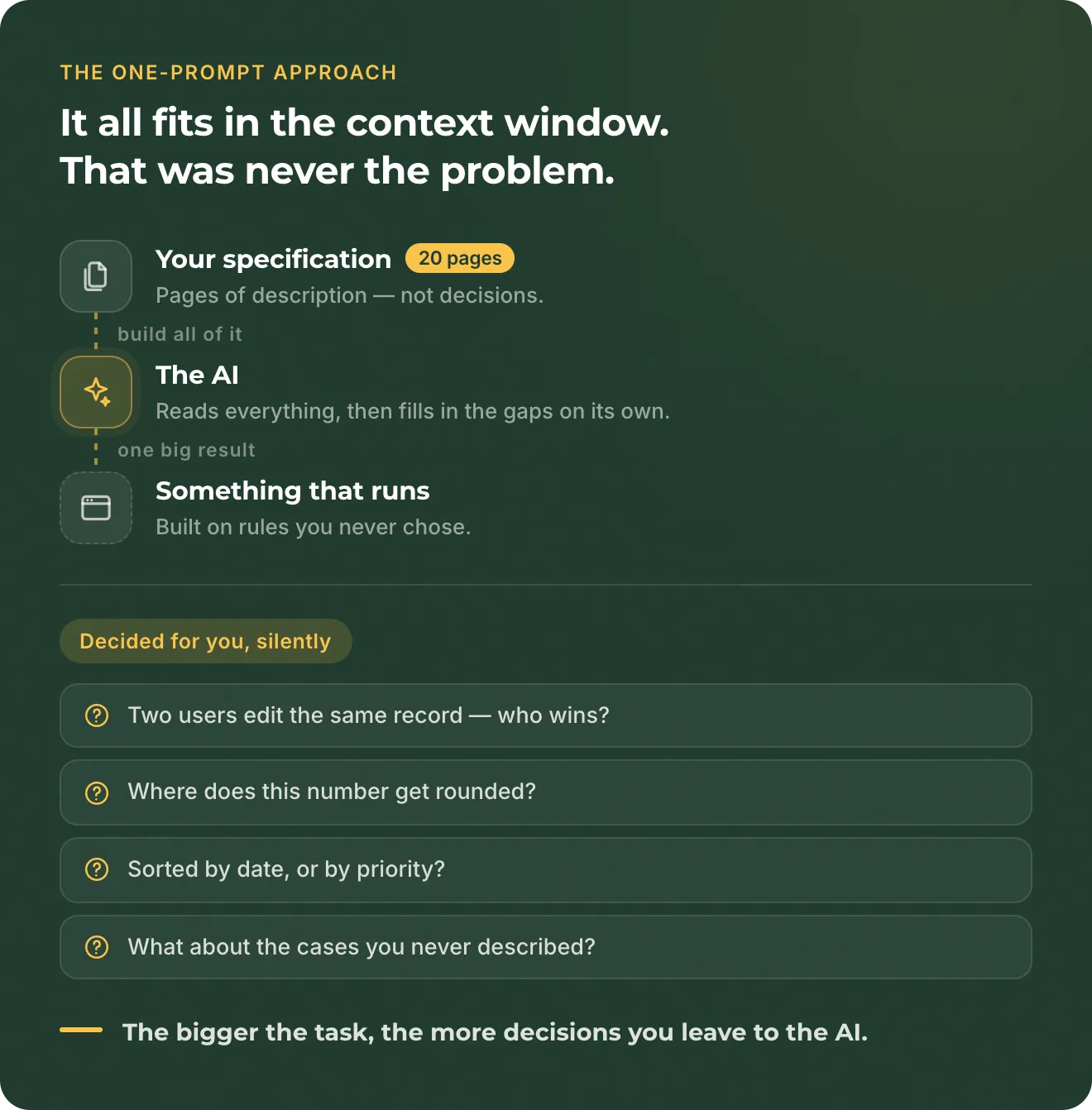
Your 20-page document fits. The model can read it. It can build something from it.
But that is not the real problem.
The problem is that it makes decisions for you.
A 20-page spec is not 20 pages of decisions. It is 20 pages of description with hundreds of small decisions left open.
What happens when two users edit the same record?
Where should that number be rounded?
Should this list be sorted by date or priority?
You may not have thought about these questions. That’s normal. But the system still needs an answer.
So the AI makes the decision.
And it does not only make small decisions.
When you ask AI to build a large feature, it also has to decide where to start, how to structure the work, which parts of the existing system to change, how those parts should connect, and what should happen in cases you did not describe.
You may not notice these decisions at first. You may only find out much later, when the system behaves differently from what you expected.
The bigger the task, the more decisions you leave to the AI.
There is also another context window. Yours.
When you build with AI, you still need to understand the system you are building.
You don’t need to know how every query works or which library handles the dates. But you do need to understand how the product behaves, what the rules are, and how the different parts depend on each other.
If you give AI 20 pages and ask it to build the whole thing, you may end up with a working app that you did not fully reason through yourself.
It may work.
But when something breaks, or a customer asks for a change, you have to understand a system that you never really planned.
This is why breaking the work down is not just a workaround for AI.
It is how you stay in control of what you are building.
This guide is about how you build. It assumes you already know what: that you have found a real problem and sold the smallest version of the fix to someone who paid for it. If you are not there yet, that is the question to answer first.
Build a process that you can control
There is no single workflow you have to follow when building software with AI. You should find a process that works for you, that you understand, and that you feel comfortable using.
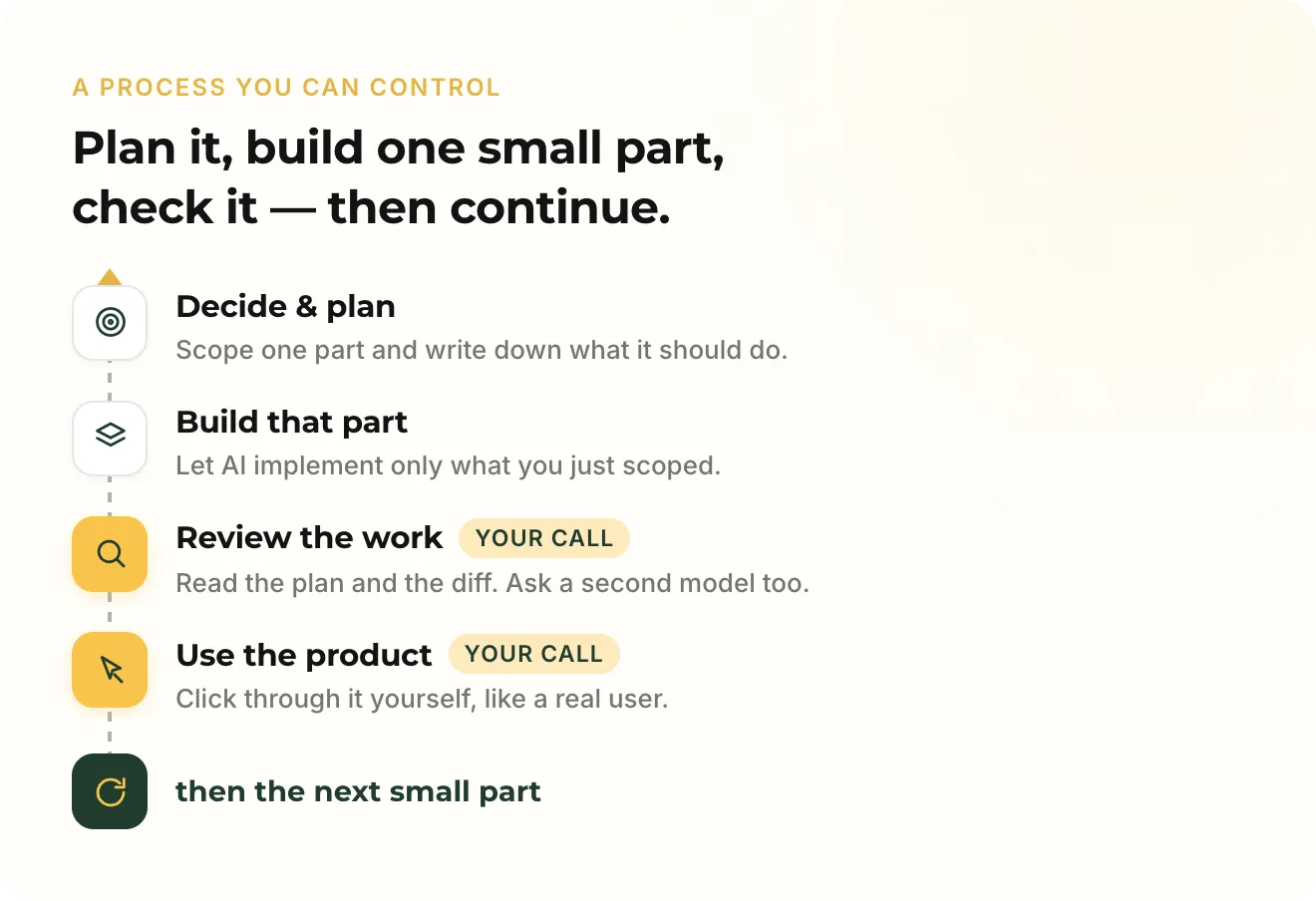
A good place to start is to look at how software has traditionally been developed. Think about the different roles in a software team. A senior developer reviews the work of other developers. A technical lead breaks down larger problems and makes architectural decisions. A manager decides what needs to happen next and checks the result.
You can take a similar role when working with AI. You are not necessarily the person writing every line of code. You are the person who decides what should be built, reviews the plan, checks the work, and decides what happens next.
Keep a human in the loop
This is one of the most important parts of working with AI. There should always be a human checking the work, and as the product gets bigger, these checks become even more important.
A software system can contain a huge number of decisions and connections. Something can easily go wrong without being obvious at first. This is not new. Software built by experienced teams has always had bugs. Good developers make mistakes, and good teams make mistakes.
The difference with AI is the amount of work that can happen between two human checks. AI can make changes much faster than a person can review them. If you let it work for too long without checking the result, a small mistake can affect many other parts of the system before you notice it.
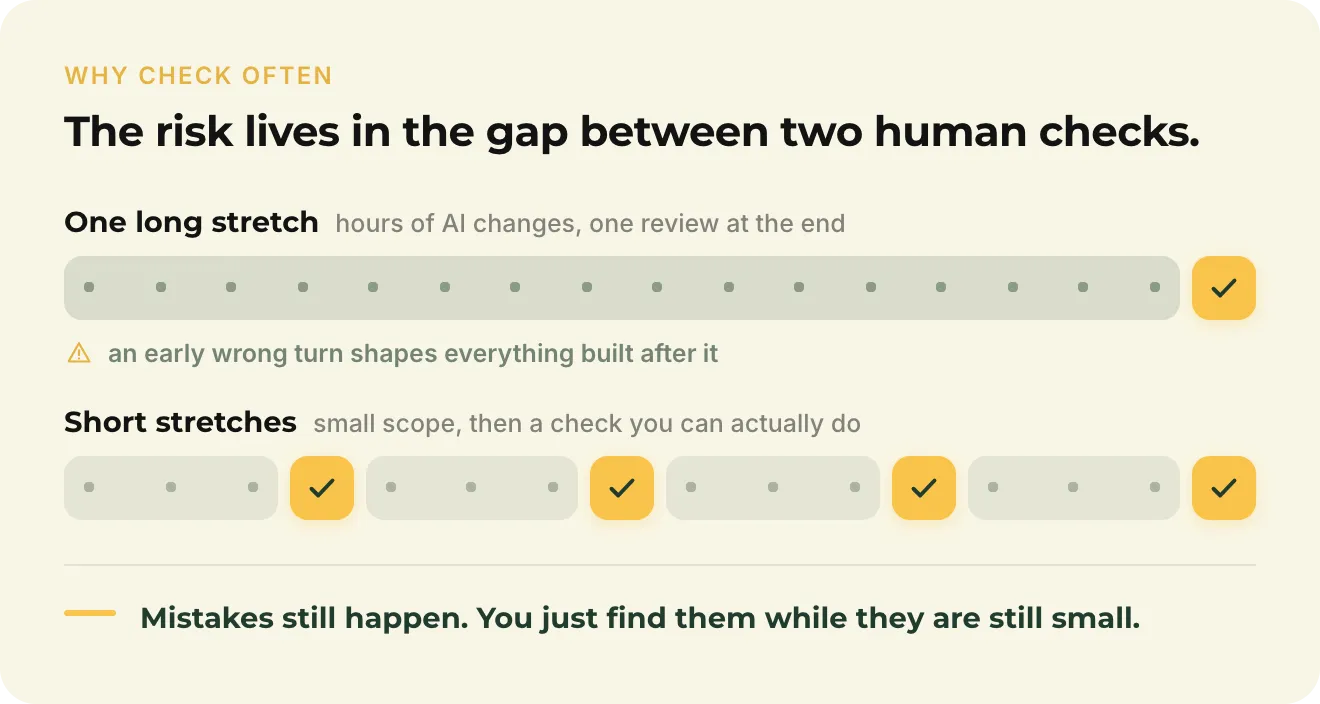
That is why I prefer to work slowly and check often.
For example, when I plan a larger feature, I usually go through several checks before and during implementation. I create the functional specification and the design, then review both with Claude Code. I ask it to identify unclear requirements, missing cases, and parts of the existing system that may be affected.
Then we create an implementation plan and break it into phases. I also do a security review and check which modules and permissions the change could affect.
After that, I implement one phase at a time. Each phase is small enough to test properly before moving on to the next one. I also regularly ask a different AI model to review the plan, because a second model can notice things the first one missed.
Test the actual product
There is one check that AI cannot replace for you: you need to use the software.
You can ask AI to review the code. You can ask it to review the architecture. You can ask another model to find problems in the plan. But none of that tells you whether the product actually behaves the way you want.
Human testing is where you can see that. Click through the feature, try the normal case, try something unexpected, and use it like a real user.
You do not need to understand every line of code to do this. You need to understand what the product should do.
Keep a record of your decisions
There is another part of this process that becomes more important as the product grows: documentation.
Save your specifications, keep your implementation plans, and record important decisions and why you made them. I keep a decision log for my projects, so I can go back and see what we decided and when.
This becomes very useful when something behaves differently months later. You can go back to the specification, the decision log, or the implementation plan and understand why the system was built that way.
The goal is not to control every line of code. The goal is to keep control of the decisions that shape the system.
Decide what will be expensive to change
Not every decision has to be made before you start building.
You will learn things as you build. Some requirements will change. Some ideas will turn out to be wrong. That is normal.
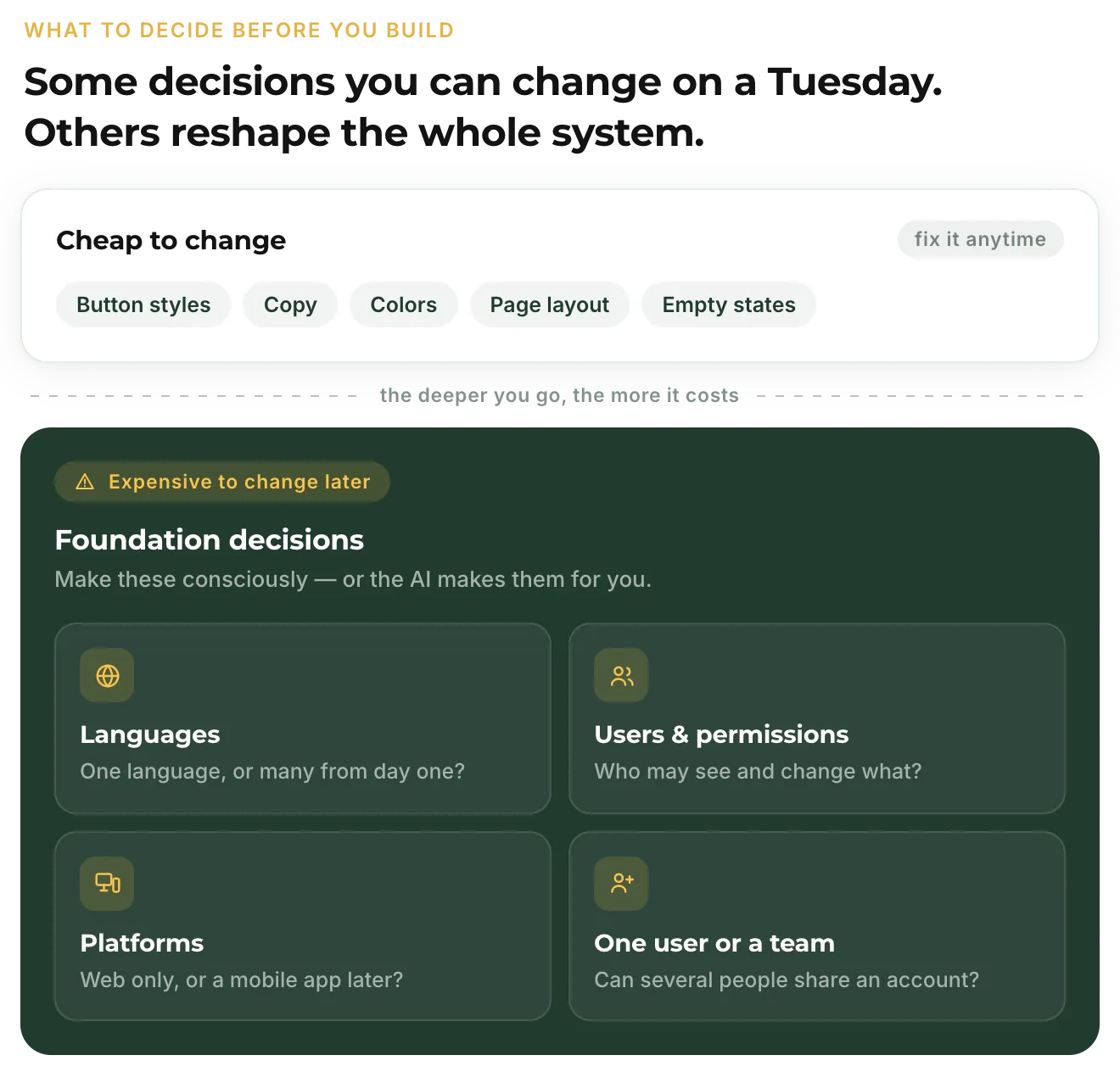
But some decisions are much more expensive to change later than others. Some of them are the basement, and you do not add one of those after the house is built.
These are the decisions you should think about before implementation, because they affect the structure of the whole system.
Languages
Do you need more than one language?
If you know from the beginning that your product will support multiple languages, the system should be designed for that from the start. Text, dates, numbers, currencies, and other content may need to work differently depending on the language and region.
If you build everything around one language and decide to add another later, you may have to change many parts of the application.
If you are certain that your product will only ever need one language, there is no reason to build a complex translation system just in case.
The important thing is to make the decision consciously.
User types and permissions
Will there be different types of users?
A simple product might start with one type of user. Later, you may discover that administrators, employees, customers, or other users need different access.
This affects much more than the interface. It affects what people can see, create, edit, and delete, and how the system checks their permissions.
If you know that different user types are likely, it is worth planning for them early.
Platforms
Will the product only be used on the web, or could you need mobile apps later?
This decision affects how you separate the core logic of the product from the interface.
If everything is built directly into the web application, reusing that logic for another platform can become difficult. You may eventually need to separate parts of the system so they can be shared between different interfaces.
You do not need to build a mobile architecture just because you might want an app someday.
But if mobile is already a realistic possibility, it should be part of the discussion before the core architecture is decided.
Single user or team
Is this a tool for one person, or could multiple people work in the same account?
A single-user product can often be much simpler. A team product introduces questions about ownership, invitations, permissions, shared data, and what happens when several people change the same thing.
Again, you do not need to build every possible feature from day one.
You need to understand which assumptions your first version is making, and which of them would be expensive to change later.
The point is not to predict everything
You cannot know everything before you start building.
The goal is not to design a perfect system for every possible future. That would create a different problem: spending time building things that may never be needed.
Instead, look for decisions that have a high cost of changing later.
If you make the wrong decision about a button, you can change the button.
If you make the wrong decision about how users, permissions, or the core business logic are structured, the change can affect the whole system.
You do not need to predict the future. You need to know which decisions are expensive to change.
Build slower. Learn faster.
AI makes it possible to build software much faster than before. That does not mean you should remove the steps that help you understand what you are building.
Define the problem. Make the important decisions. Plan the work. Let AI help with the implementation. Check the result. Test it. Then move to the next part.
You will still make mistakes. AI will still make mistakes. The point is not to prevent every mistake. The point is to find them while they are still small and easy to fix.
The more software you build, the more important this becomes.
AI can help you build faster. Your process is what keeps the result under control.